Find the videos taking up the most space on iPhone
In short
- The Photos app has no sort by size.
- Method 1: in iPhone Storage, the Review Personal Videos recommendation, when iOS offers it, lists your videos from heaviest to lightest.
- Method 2: in Photos, filter Videos and tap (i) to see each file's size.
- Method 3: an app that ranks all your videos by weight, like PhotoCorner and its "Heaviest" view.
Why videos fill up your iPhone
A video's size depends mostly on its length and format. In 4K at 60 frames per second, one minute weighs several hundred MB; slow-motion is very hungry too. In Settings › Camera › Record Video, iOS even shows the estimated size of one minute for each format.
The result: a few holiday or school-show videos can weigh more than all your photos together.
Method 1: the iOS recommendation
- Open Settings › General › iPhone Storage.
- Below the storage bar, look at the recommendations (tap Show All if there are several).
- If Review Personal Videos shows up, tap it: your videos are listed from heaviest to lightest.
- Swipe a video left to delete it.
The limit
This recommendation doesn't always appear, and it only shows videos stored on the iPhone. It's also hard to judge a video without watching it again.
Method 2: in the Photos app
- Open Photos and scroll to Media Types, then Videos.
- Look for the thumbnails with the longest duration: they're usually the heaviest.
- Open a video and tap (i): the file size shows with its details.
It works, but one video at a time. With hundreds of videos, there goes your evening.
Method 3: all your videos ranked by weight
In PhotoCorner, the Heaviest view shows each video at the size of its weight: you see where your gigabytes live at a glance. Then you review them, heaviest first, with the same gestures as for photos: keep, file into an album, review later or delete.
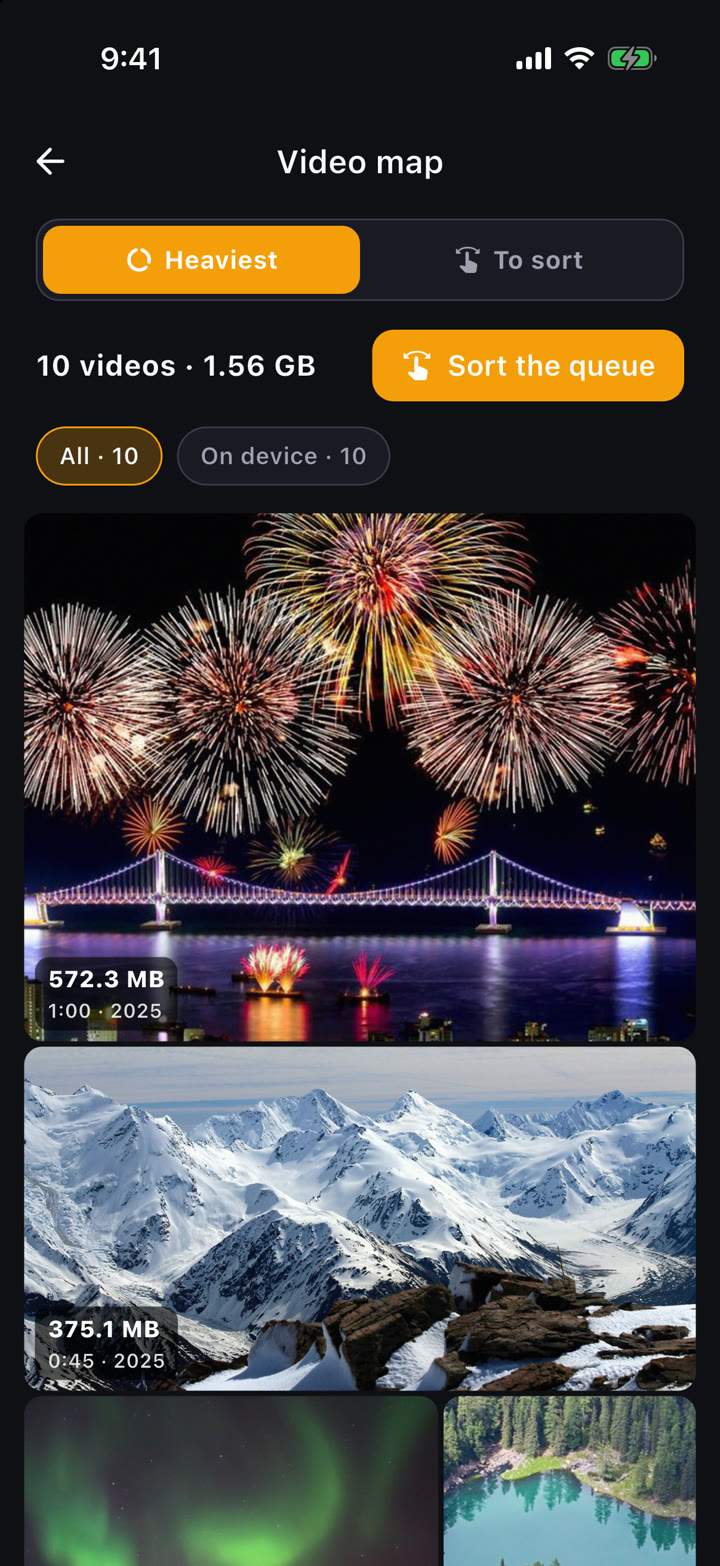
- Videos stored in iCloud play streamed, without downloading the originals to your phone.
- Everything happens on your iPhone, no AI and no server: your videos aren't sent anywhere.
- Video sorting is part of PhotoCorner Premium (7-day free trial on the yearly plan).
Before deleting an important video
- Copy it to a computer (AirDrop to a Mac, or cable) or to an external drive through the Files app.
- With iCloud Photos on, deleting on the iPhone deletes everywhere: keep a copy elsewhere if you care about the original.
- Remember to empty Recently Deleted, or the space only comes back after 30 days.
So it doesn't happen again
In Settings › Camera › Record Video, 1080p at 30 fps is enough for most family videos and takes far less space than 4K. Keep 4K for the moments you really want maximum quality.
FAQ
Can you sort videos by size in the Photos app?
No, the Photos app doesn't offer that sort. Use the iPhone Storage recommendation when it appears, check videos one by one, or use a dedicated app.
Why is a short video so big?
Format matters as much as length: 4K at 60 fps and slow-motion produce much bigger files than 1080p at 30 fps.